Portfolio overview
Your whole portfolio, at a glance.
Every property sits beside its tenancy on one screen. Whether it's let, which certificates are in date, what rent is due, who is behind and whether the deposit is protected: you can read the lot without opening a single record.
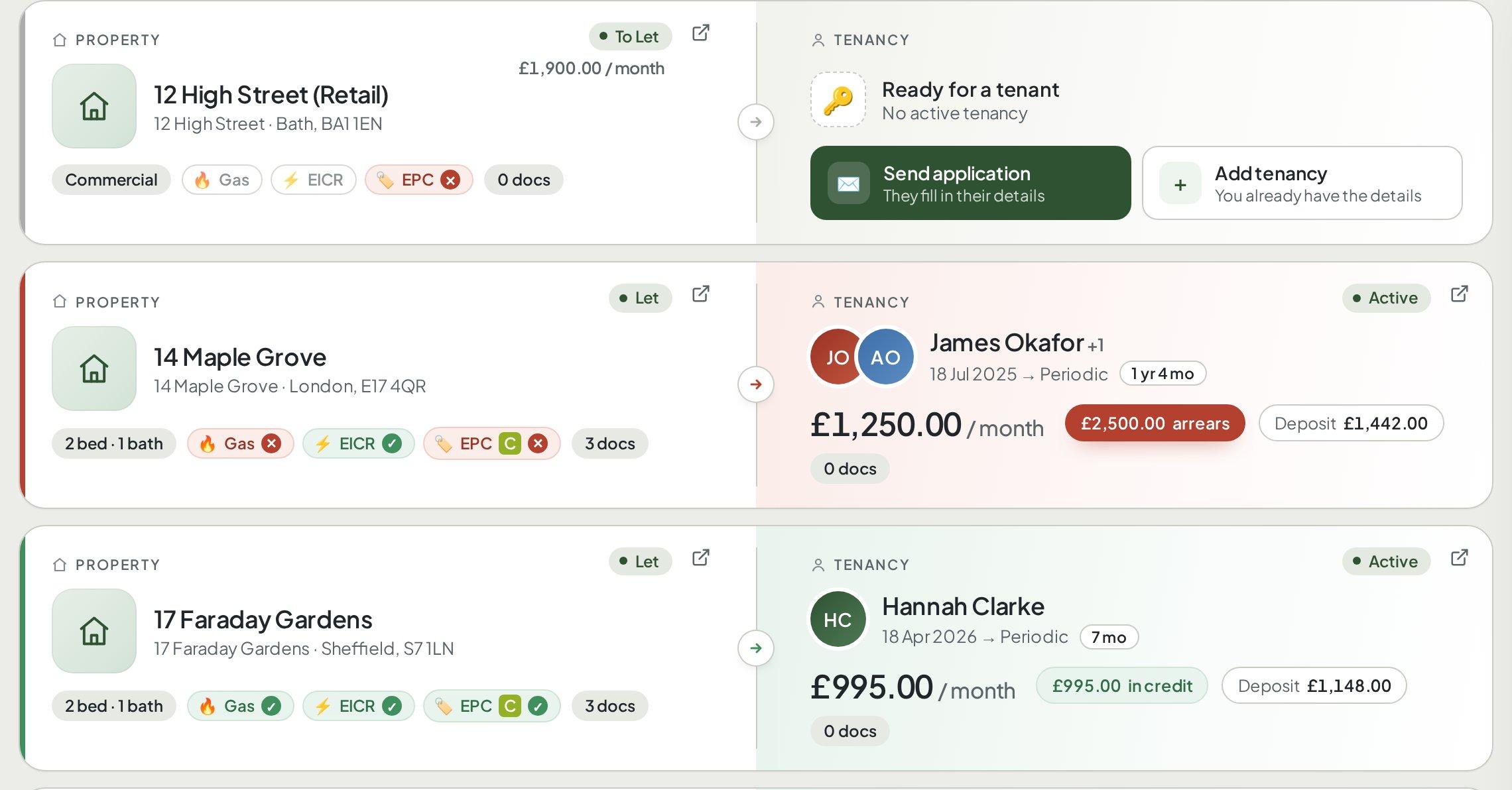
The real Portfolio screen, with sample data.
How it works
Portfolio overview, step by step.
- 01
The property
Let, vacant or vacating, in one word
Each card opens with the property's status, so empty homes stand out. A setup score shows how complete the record is, beside the bedrooms, bathrooms, EPC rating and how many documents are on file.
- 02
Compliance
A tick, a warning or a cross on every certificate
Gas Safety, electrics (EICR), EPC and licences each get a small icon with a tick when valid, a warning when one is due soon, and a cross when it has expired or is missing. Run your eye down the page and the gaps jump out.
- 03
The tenancy
Who lives there, what they pay, what they owe
Beside each property is its tenancy: the tenant (and how many others), the start date and whether it's periodic, the monthly rent, arrears in red or a clear balance, and the deposit held. Tenants giving notice are flagged as vacating, and empty homes offer Send Application or Quick Tenancy straight from the card.
See every property in one place.
Your first month is free — every feature, no card needed to start.